🚀 현재 프로젝트 환경 정리
✅ 네이버 스타일 로그인 & 블로그 시스템 구현 중
✅ 사용된 기술 및 개발 도구 정리
📌 프로젝트 개요
- 프로젝트명: 네이버 스타일 로그인 & 블로그 클론 코딩
- DB: 로컬 스토리지 (LocalStorage) 사용 (별도 백엔드 없이 클라이언트 측 저장)
- 프레임워크: React (JSX 기반 UI 구성)
- 개발 언어: Javascript
- 개발툴: Visual Studio Code
게시글에 빠질 수 없는 댓글을 구현하려고 한다.
원하는 디자인을 구상했을 때 이런 느낌이다.
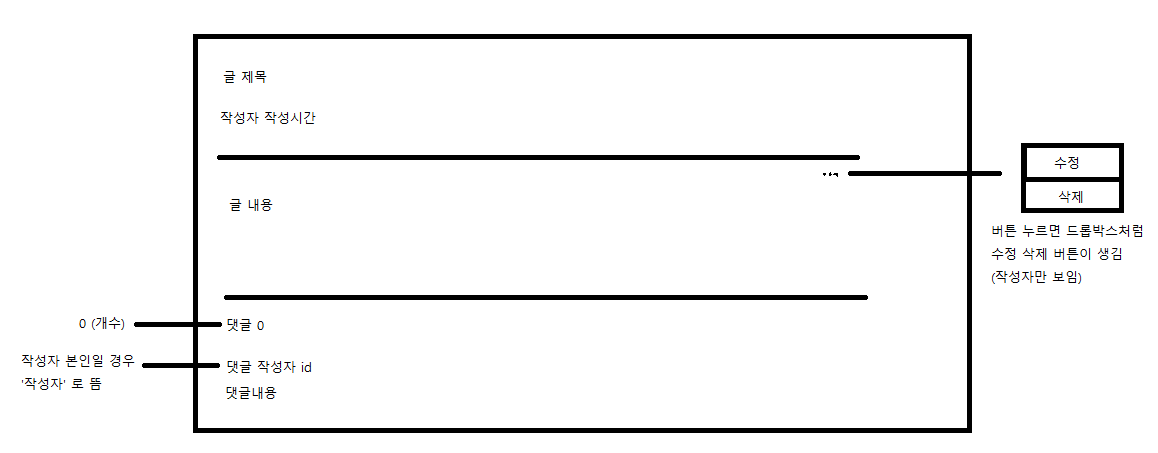

PostDetail.js
import React, { useState, useEffect } from "react";
import { useParams, useNavigate } from "react-router-dom";
import "./Blog.css";

function PostDetail() {
    const { id } = useParams();
    const navigate = useNavigate();
    const [post, setPost] = useState(null);
    const [comments, setComments] = useState([]);
    const [commentText, setCommentText] = useState("");
    const [showOptions, setShowOptions] = useState(false); // 수정/삭제 버튼 표시 여부
    const loggedInUser = JSON.parse(localStorage.getItem("loggedInUser")); // 현재 로그인한 사용자 정보


    useEffect(() => {
        const savedPosts = JSON.parse(localStorage.getItem("posts")) || [];
        const foundPost = savedPosts.find(p => p.id === Number(id));
        setPost(foundPost);

        const savedComments = JSON.parse(localStorage.getItem(`comments_${id}`)) || [];
        setComments(savedComments);
    }, [id]);

    const handleAddComment = () => {
        if (!commentText.trim()) return;
        const newComment = {
            id: Date.now(),
            text: commentText,
            author: loggedInUser?.username || "익명"
        };

        const updatedComments = [...comments, newComment];
        setComments(updatedComments);
        localStorage.setItem(`comments_${id}`, JSON.stringify(updatedComments));
        setCommentText("");
    };

    const handleDeletePost = () => {
        if (window.confirm("정말 게시글을 삭제하시겠습니까?")) {
            const savedPosts = JSON.parse(localStorage.getItem("posts")) || [];
            const updatedPosts = savedPosts.filter(p => p.id !== Number(id));
            localStorage.setItem("posts", JSON.stringify(updatedPosts));
            navigate("/"); // 삭제 후 메인 페이지로 이동
        }
    };

    if (!post) return <p>게시글을 찾을 수 없습니다.</p>;

    return (
        <div className="post-detail-container">

            {/* ✅ 글 정보 */}
            <h2 className="post-title">{post.title}</h2>
            <p className="post-meta">
                {post.author} | {new Date(post.createdAt).toLocaleString()}
                {loggedInUser?.username === post.author && <span className="author-tag">작성자</span>}
            </p>

            <div className="post-content" dangerouslySetInnerHTML={{ __html: post.content }} />

            {/* ✅ 작성자가 로그인한 사용자와 동일할 경우 수정/삭제 버튼 표시 */}
            {loggedInUser?.username === post.author &&

                <div className="post-options">
                    <button className="more-button" onClick={() => setShowOptions(!showOptions)}>⋮</button>
                    {showOptions && (
                        <div className="options-menu">
                            <button onClick={() => alert("수정 기능 구현 필요")}>수정</button>
                            <button onClick={handleDeletePost} className="delete-btn">삭제</button>
                        </div>
                    )}
                </div>
            }

            {/* ✅ 댓글 섹션 */}
            <div className="comment-section">
                <h3>댓글 <span className="comment-detail-count">({comments.length})</span></h3>

                <div className="comment-input-container">
                    <input
                        type="text"
                        placeholder="댓글을 입력하세요"
                        value={commentText}
                        onChange={(e) => setCommentText(e.target.value)}
                        className="comment-input"
                    />
                    <button onClick={handleAddComment} className="comment-button">댓글 작성</button>
                </div>

                <ul className="comment-list">
                    {comments.length === 0 ? (
                        <p className="no-comments">댓글이 없습니다.</p>
                    ) : (
                        comments.map(comment => (
                            <li key={comment.id} className="comment-item">
                                <strong>{comment.author}</strong> {loggedInUser?.username === comment.author && <span className="author-tag">작성자</span>}
                                <p>{comment.text}</p>
                            </li>
                        ))
                    )}
                </ul>
            </div>
            <button onClick={() => navigate(-1)} className="back-button">뒤로가기</button>
        </div>
    );
}

export default PostDetail;
Blog.css
.post-detail-container {
  max-width: 800px;
  margin: 30px auto;
  padding: 30px;
  border: 1px solid #ddd;
  border-radius: 10px;
  background: white;
}

/* ✅ 뒤로 가기 버튼 스타일 */
.back-button {
  background: #ddd;
  border: none;
  padding: 5px 10px;
  cursor: pointer;
}

/* ✅ 제목 및 작성자 정보 */
.post-title {
  font-size: 24px;
  font-weight: bold;
  padding-bottom: 10px;
}

.post-meta {
  color: #777;
  font-size: 14px;
  padding: 10px 0;
  border-bottom: 2px solid #ddd;
}

/* ✅ 본문 내용 */
.post-content {
  padding: 20px 0;
  border-bottom: 2px solid #ddd;
}

/* ✅ 작성자 태그 */
.author-tag {
  background: #04cf5c;
  color: white;
  padding: 2px 6px;
  font-size: 12px;
  border-radius: 3px;
  margin-left: 5px;
}

/* ✅ 옵션 버튼 (더보기 버튼) */
.post-options {
  position: absolute;
  top: 10px;
  right: 10px;
}

.more-button {
  background: none;
  border: none;
  font-size: 20px;
  cursor: pointer;
}

.options-menu {
  position: absolute;
  background: white;
  border: 1px solid #ddd;
  box-shadow: 0px 2px 5px rgba(0, 0, 0, 0.2);
  padding: 5px;
  display: flex;
  flex-direction: column;
}

.options-menu button {
  background: none;
  border: none;
  padding: 5px;
  cursor: pointer;
  text-align: left;
}

.options-menu .delete-btn {
  color: red;
}

/* ✅ 댓글 섹션 */
.comment-section {
  margin-top: 20px;
}

.comment-detail-count {
  font-size: 14px;
  color: #777;
}

/* ✅ 댓글 입력 창 */
.comment-input-container {
  display: flex;
  gap: 10px;
  padding: 10px 0;
}

.comment-input {
  flex: 1;
  padding: 5px;
}

.comment-button {
  background: #04cf5c;
  color: white;
  border: none;
  padding: 5px 10px;
  cursor: pointer;
}

/* ✅ 댓글 리스트 */
.comment-list {
  list-style: none;
  padding: 0;
}

.comment-item {
  padding: 10px;
  border-bottom: 1px solid #ddd;
}

.no-comments {
  color: #777;
}
.post-options {
  position: absolute;
  top: 10px;
  right: 10px;
}

.more-button {
  background: none;
  border: none;
  font-size: 20px;
  cursor: pointer;
}

.options-menu {
  position: absolute;
  background: white;
  border: 1px solid #ddd;
  box-shadow: 0px 2px 5px rgba(0, 0, 0, 0.2);
  padding: 5px;
  display: flex;
  flex-direction: column;
}

.options-menu button {
  background: none;
  border: none;
  padding: 5px;
  cursor: pointer;
  text-align: left;
}

.options-menu .delete-btn {
  color: red;
}
✅ 해결해야 하는 점
1️⃣ 현재 server.js에서 JWT로 인증된 유저 데이터와 클라이언트의 localStorage 유저 데이터가 따로 관리되어 있어서 localStorage.getItem("loggedInUser")가 null로 나오는 상태임. JWT 로그인 시 유저 정보를 로컬 스토리지에 저장하고, 이후 요청마다 JWT 토큰을 통해 인증하도록 해야 함.
'Project' 카테고리의 다른 글
| [javascript] 네이버 클론 코딩 + 블로그 5: 게시글 수정 (0) | 2025.03.13 |
|---|---|
| [javascript] 네이버 클론 코딩 + 블로그 5: 답글 & 공감 (0) | 2025.03.12 |
| [javascript] 네이버 클론 코딩 + 블로그 4: JWT 발급 (0) | 2025.03.12 |
| [javascript] 네이버 클론 코딩 + 블로그 2: 글쓰기 에디터 + 경고 메시지 (1) | 2025.03.10 |
| [javascript] 네이버 클론 코딩 + 블로그 1 (0) | 2025.03.06 |